AI TOOL PROFILE
Floik: Interactive Demo and Guide Software
- Marketing
- Sales Enablement
- SaaS companies
- Sales teams
- Customer success managers
Pricing
Pricing starts at $39/month for the Pro plan, with a Pro+ plan at $119/month. A free Starter plan is available, and a 14-day premium trial is offered.
At a glance
- Best for
- SaaS companies, Sales teams, Customer success managers
- Key use cases
- Buyer Education, Sales Enablement, Customer Activation, Customer Enablement, SOP Documentation
- Integrations
- PDF export, HTML export, Markdown export, MP4 export, GIF export
- Official website
- Visit Floik tools official website

How AI is used
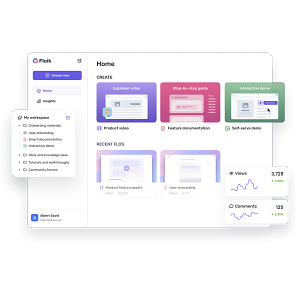
Floik is a content creation tool for SaaS teams to build interactive product demos, explainer videos, and step-by-step guides. It uses a Chrome extension to capture workflows, which can then be edited into different formats to support various stages of the customer journey.
The tool is intended for sales teams and customer success managers who need to demonstrate product value to prospects or onboard users. It includes AI features for voiceovers, transcription, and guide generation.
Users can record their screen and apply customizations such as blurring sensitive data, trimming clips, and adding interactive elements. The platform also supports a 'demo center' to organize multiple showcases in one location.
Buyers should confirm which export formats and team permissions are included in their specific plan, as these features vary by tier.
Key Features
Multi-format Content Creation
Supports creating interactive demos, step-by-step guides, and explainer videos from one screen recording.
AI-Powered Tools
Includes AI for voiceover, transcription, subtitles, rephrasing, translation, and guide generation.
Screen Capture Extension
A Chrome extension used to record browser tabs, windows, or the full screen.
Content Redaction
Includes a blur tool to hide sensitive information during and after the recording process.
Demo Center
Supports organizing multiple product showcases into a single shared folder or landing page.
Custom Branding
Supports the use of brand logos, brand colors for interactive elements, and custom domains for shared links.
Use Cases
Buyer Education
Creating self-guided interactive demos so prospects can explore product value.
Sales Enablement
Developing personalized content and interactive leave-behinds to support sales conversations.
Customer Activation
Building onboarding walkthroughs to help new users navigate the product.
Customer Enablement
Producing how-to guides and feature updates to support a self-serve help center.
SOP Documentation
Converting internal processes into step-by-step instructional guides.
Integrations
- PDF export
- HTML export
- Markdown export
- MP4 export
- GIF export
FAQ
Is there a free version of Floik?
- Yes, Floik offers a free Starter plan that allows users to share up to 5 Flos and includes basic insights and AI transcription.
Do I need a credit card to try Floik?
- No, a credit card is not required to sign up for the starter plan or the 14-day free premium trial.
Can Floik create different types of content from one recording?
- Yes, users can record their screen once and then use that recording to generate a standalone video, an interactive guide, or a step-by-step guide.
Source category: Marketing
Source subcategory: Sales Enablement
More tools in Marketing
Other published listings in the Marketing category.


More tools in the Sales Enablement software type
Related listings that share the same software type for comparison and shortlisting.


